Projects, organisations and floors
How a run is bound to a directory, and the limits of that binding.
A project in dev3d — the code and the wire protocol call it a workspace, and the UI calls it a project sitting on a floor — is a directory. Runs are bound to it when they are submitted, every file tool resolves paths against it, and the record stays truthful afterwards. That is a real boundary between one project and another, and it is worth being precise about what it is not.
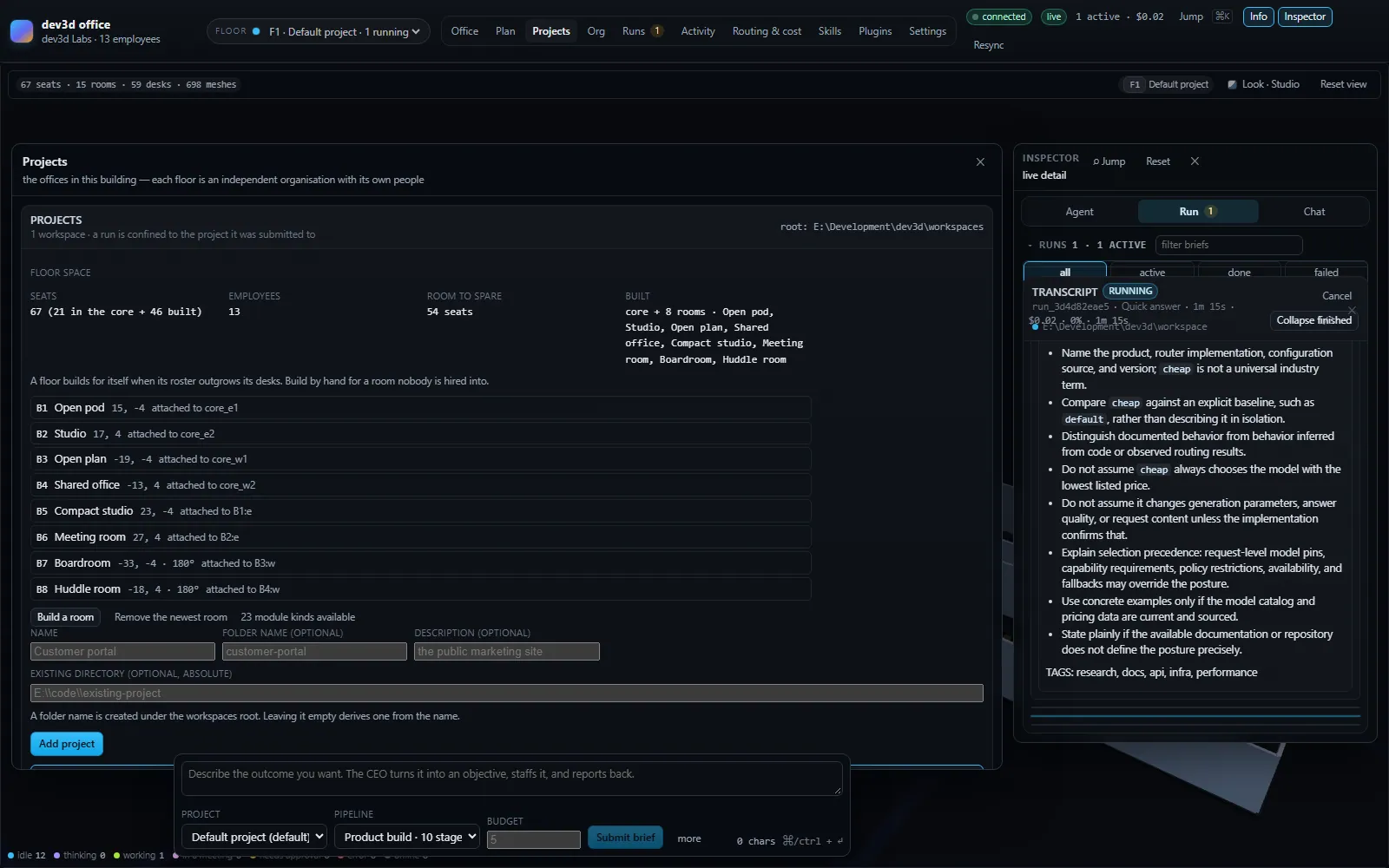
The run is frozen to a directory
When a brief is submitted, the engine resolves which organisation owns it and copies two fields onto the run:
| Field | What it is |
|---|---|
Run.workspaceId | The organisation the run worked in |
Run.workspacePath | The absolute directory, resolved at submit time |
Both are written once and never rewritten. That is what makes a run record honest: its path names the directory the work actually happened in, not the directory that is configured now. Rename the project, move it, or forget it entirely and the run still says where it wrote.
Every scoped lookup during the run is keyed by the run's organisation rather than by anything global: the org chart, the roster, the budget, the workspace's skill list, and the workspace root the tools are confined to. There is no ambient "current project" that a long run could drift away from. A stage that takes ten minutes and a provider retry in the middle still resolves every path against the directory the brief was submitted against.
Submission also resolves the money and the pipeline in the same place. The run's budget limit is the submitted budget or the project's budget.defaultRunUsd, which defaults to 5 dollars. Naming a workspace that does not exist fails the submission outright with There is no workspace "x" in this office. rather than quietly falling back to the default one — which matters, because the fallback would mean a run writing into a directory nobody chose.
Two ways to add a project
There are exactly two, and they say the same thing two different ways, which is why the form refuses to accept both at once: "Give either a folder name or a full path, not both — they say the same thing twice."
A folder name under the workspaces root
This is the common case. The folder is created under DEV3D_WORKSPACES_ROOT, default ./workspaces, and the name is validated rather than sanitised silently: it cannot be empty, cannot contain .. and cannot contain a path separator. Leave it blank and one is derived from the project's name by lowercasing, replacing runs of non-alphanumerics with a hyphen, trimming and capping at 40 characters, falling back to the literal office if nothing survives. Missing intermediate directories are created.
The resulting id is slugified the same way and de-duplicated with a numeric suffix, so two projects called "Customer Portal" do not collide.
An absolute path elsewhere on the machine
The other case is an existing directory somewhere else, such as E:\code\existing-app. The server requires the path to be absolute and says so in the refusal if it is not:
"src/app" is not an absolute path. Give a full path (like E:\code\project),
or leave the path empty and give a folder name to create one under the
workspaces root.
This form is gated by DEV3D_ALLOW_EXTERNAL_WORKSPACES, which is true by default and disables only on the literal string false. When it is off, a path outside the workspaces root is refused with a message naming both the target and the permitted root, and telling you which setting to change. The containment check reuses the tool layer's own path check, so "inside the workspace" means exactly one thing in this codebase rather than two implementations that nearly agree.
Two projects cannot share a directory: An office already works in <path>. That is a real constraint rather than a formality, because two organisations writing into one tree would make every run record ambiguous.
Why external projects are on by default. The point of the office is working on real projects that already exist elsewhere, and an operator typing an absolute path is the consent. The consequence is stated plainly in the shipped environment file: a workspace's directory becomes fully readable and writable to employees, so setting DEV3D_ALLOW_EXTERNAL_WORKSPACES=false is how you make the workspaces root a hard boundary instead of a default.
What the boundary actually stops
The enforcement is one function. Every path-taking filesystem tool funnels its target path through resolveInWorkspace, which rejects .., rejects absolute paths outside the root, and specifically rejects Windows drive-relative forms like C:foo and D:bar — the trick that makes a path look relative while resolving to a drive root. It also rejects a : that would name an NTFS alternate data stream and any component that is a reserved Windows device name. Then it does the part a lexical check cannot: it resolves the real path of both the root and the target, and refuses any symlink, junction or mount point it meets on the way out — because a link inside the workspace is otherwise a way straight out of it, and a junction is not exotic on a machine with a package manager on it. Containment is compared case-insensitively, because C:\ and c:\ are the same location on Windows. The root it uses is the run's workspace root, not the installation's.
That is a genuine choke point, and for the eight tools that call it, it is the whole story. But it is one function called from eight places, out of fifteen built-in tools — and the gap between "the engine confines paths" and "nothing can leave the workspace" is where the honest documentation lives.
| Action | Stopped? | By what |
|---|---|---|
read_file / write_file / edit_file / list_dir / search_files reaching outside the run's directory | Yes | resolveInWorkspace, called by all five |
A .. path or an absolute path outside the root | Yes | The same check, before the filesystem is touched |
A Windows drive-relative path such as C:foo | Yes | A dedicated check with its own refusal message |
| One project reading or writing another project's directory | Yes, as long as both are separate workspaces | Each run resolves against its own root |
think reaching anything | Not applicable | It takes no path argument at all; it is a scratchpad with no I/O |
web_search / web_fetch reaching a non-HTTP URL | Partly | A protocol check — only http:// and https:// URLs are allowed. There is no path confinement, because there is no path |
run_shell text leaving the workspace | No | Only its working directory is set. Shell text can read or write anywhere the process user can reach |
| A plugin tool reaching outside the workspace | No | The host passes the workspace root to the plugin's tool and the plugin may do whatever it likes with it |
| The operator reading any project's directory through the console | No | The projects list shows every registered path; nothing gates it by role |
A plugin's activate() reaching anything | No | It runs in the orchestrator's own process, with the orchestrator's authority |
| Deleting a project's files when you remove it from the console | Not attempted | Removal forgets the registration and touches nothing on disk |
Read the last four rows as one statement: the boundary protects one project from another project's agents. It does not protect the machine from the operator. That is not a defect to be papered over — it is the trust model. dev3d is software you point at a machine you control, running projects you chose. The known gaps page keeps the same list in the same voice.
Where it stops being a boundary
Three specific places, each with a reason rather than an excuse.
The workspaces root is not a secret
Every registered project's absolute path is in the console's own state, drawn on the Projects page as a monospaced line on each card. Anyone who can reach the UI can read where the office works, and can add a project pointing at any directory the process user can reach — which is the point of the external-project feature. There is no per-user authorisation and no authentication layer in the orchestrator; the deployment is expected to be on a trusted network or behind something that provides one.
Removing a project does not delete it
removeWorkspace is deliberately narrow. It drops the registration from the office state, drops the in-memory roster, repoints the active organisation to the default office if the removed one was active, and logs closed "name"; its directory and runs are untouched. Deleting a directory full of somebody else's work is never something a UI button should do, and neither is deleting the run history that proves what happened there. The console's confirmation says the same thing in fewer words: forget this project? its files and runs are kept.
The first organisation cannot be closed at all, because it is the fallback when nothing else is selected — the refusal names that reason. If you genuinely want a project gone, remove its directory yourself; the office will not do it for you, and will not pretend it did.
Plugin code runs with the orchestrator's authority
A code plugin's entry module is imported into the server process and its activate() runs there. It is not sandboxed, not run in a worker, and not given a restricted environment. A tool a plugin contributes is adapted into an ordinary tool that receives the workspace root — but receiving it is all that happens; the host does not enforce that the plugin uses it, or confine anything the plugin does outside the tool interface.
This is why installing a plugin is gated. DEV3D_ALLOW_PLUGIN_INSTALL defaults to false, and the marketplace's install button is off until an operator turns it on, because installing runs someone else's code inside the process that holds your provider keys. Enabling a plugin you already have on disk is a different decision from downloading one, and the two are deliberately separate.
The single most useful sentence on this page. If a task needs a genuine sandbox — an untrusted repository, an untrusted plugin, a multi-tenant deployment — dev3d does not provide one. Use a container, a VM or a dedicated user account, and treat the workspace root as a helpful default rather than a security control. The confinement that does exist is real and worth relying on for the thing it was built for: keeping one project's agents inside that project.
Floors: which organisation, and which storey
Every organisation occupies a floor, and the floor number is a field on the workspace. New projects get the next free floor above the highest one in use; floor 1 is the ground floor. The vertical gap between storeys is 4.2 metres, against walls three metres tall, and each floor is drawn from its own summary — including ones you are not looking at, because a floor grows whether or not anyone is watching it.
Switching floors is a wire command rather than a local view state. The console sends selectWorkspace and the server answers with a fresh office.updated carrying the whole context: people, skills, money, runs and floor. One event swaps the entire context, which is why switching organisations does not involve a sequence of panel reloads or a partially-updated screen. There is no selectFloor command — the floor is the organisation, and the two names never refer to different things. Wire protocol has the full command list.
Organisations are independent in the ways that matter. A separate roster, separate roster state, separate skills, separate money, separate budget, separate floor, separate layout. A run cannot be moved between them: workspaceId is frozen at submit time, and closing a floor does not migrate its history anywhere. If you want the same work done in a different directory, submit it there — the office will not silently retarget an existing run.
What to check when a run wrote in the wrong place
| Symptom | What to check |
|---|---|
| Files appeared in a directory you did not expect | The run's workspacePath, not the currently selected project. If the submission named no workspace, the default office owned it |
| An absolute path was refused | DEV3D_ALLOW_EXTERNAL_WORKSPACES. The refusal message names the setting; it disables only on the literal false |
| A folder name was refused | It contained a path separator or .., or both a folder and a path were supplied |
| Two projects cannot be created on the same directory | Expected. One directory, one organisation |
| A tool wrote outside the workspace anyway | It was almost certainly run_shell, which is confined only by its working directory, or a plugin tool, which is not confined at all |
| A project disappeared from the list but its files are still there | Expected. Removal forgets the registration; nothing on disk is touched |
The routing side of the same story — what each of those runs costs, and how a model is picked for each turn — is Model routing. The page before it, The office, explains why a project looks like a floor in the first place.
Where to go next
Linked from
Did this page answer your question?