Quick start
From a clean checkout to a running office in two commands, plus health checks, curl and the test suites.
dev3d is a pnpm workspace with two processes: an orchestrator that runs the office, and a Vite dev server that serves the UI and proxies to it. Two commands after install get you a fully working, fully demonstrable office with no API keys at all.
Prerequisites
| Requirement | Why it is a floor rather than a suggestion |
|---|---|
| Node 24 or newer | The root package.json declares "engines": { "node": ">=24.0.0" }. The test suites run TypeScript directly through node --test --test-isolation=none, and persistence is built on the unflagged node:sqlite. Both are Node 24 features, and both fail loudly or degrade silently on older runtimes. |
| pnpm | The repository pins "packageManager": "pnpm@11.22.0" and ships a lockfile in that format. There is no engines.pnpm field: the pin is the floor, enforced by corepack, so corepack enable is the reliable way to get the right version. |
| No database server | Persistence is a single SQLite file at DEV3D_DB (default ./data/dev3d.sqlite). If it cannot be opened the store degrades to memory and says so — see the troubleshooting table below. |
| No API keys | Optional, and genuinely optional. With none, the server boots in mock mode and the whole pipeline runs on scripted employees. |
The two commands
pnpm install                 # Node >= 24; the workspace has four packages plus plugins
cp .env.example .env         # optional: add provider keys for live models

pnpm dev:server              # orchestrator on http://127.0.0.1:8787
pnpm dev:web                 # office UI on http://127.0.0.1:5273 (proxies /api and /ws)
That is the whole setup. pnpm install is the workspace install; pnpm dev:server and pnpm dev:web are filtered scripts that start the two packages in parallel terminals. pnpm dev runs both at once if you prefer one terminal and do not mind interleaved output.
The web dev server binds 5273 with strictPort on, which matters more than it sounds: it fails rather than silently moving to 5274, so a stale tab can never end up talking to nothing. It proxies /api and /ws to the orchestrator, and it reads that target from DEV3D_SERVER_PORT and then PORT, so a server on a different port needs no edit to the proxy. If you would rather not run Vite at all, build the UI once and let the orchestrator serve it from apps/web/dist.
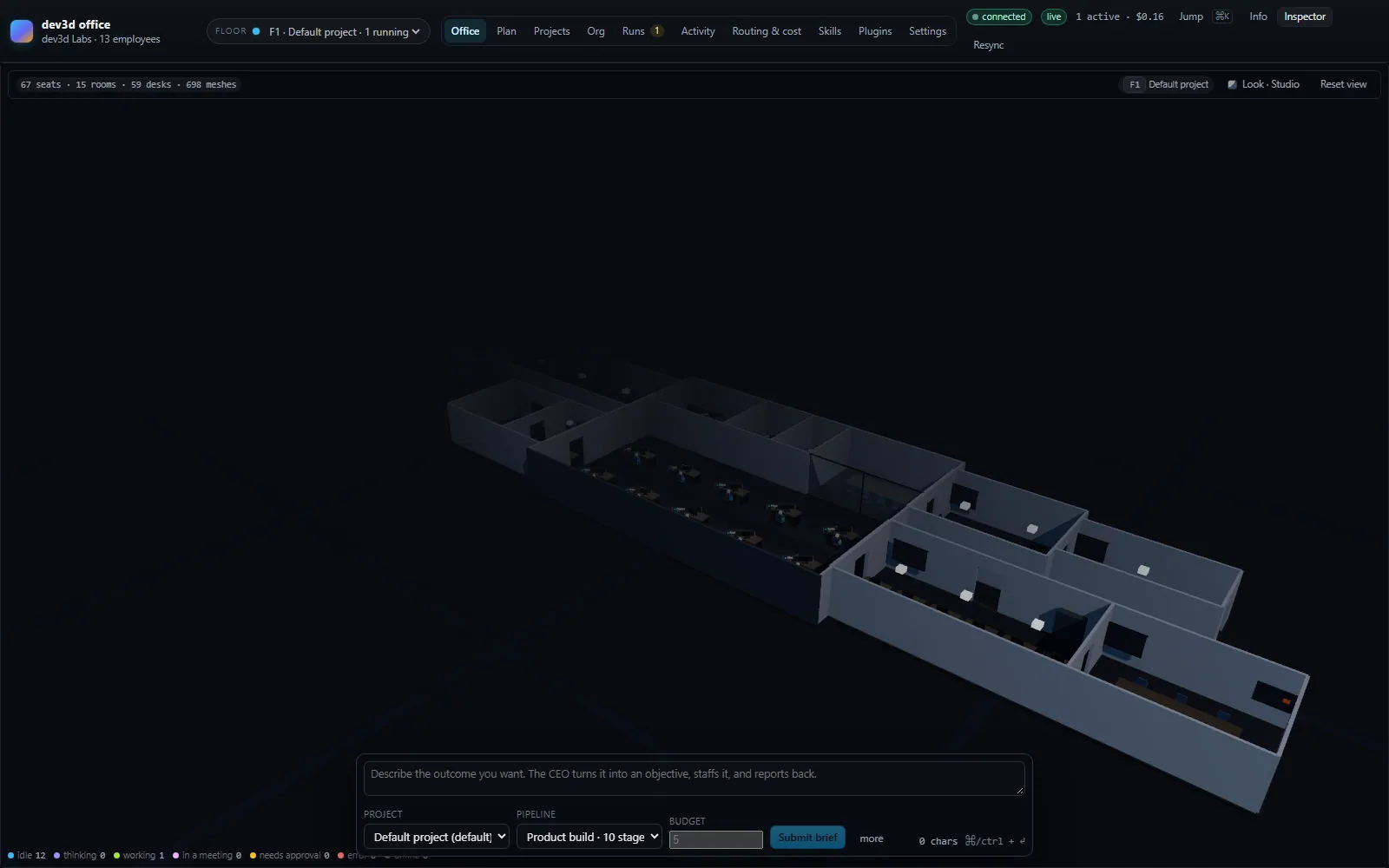
What the boot log tells you
The orchestrator announces what it decided rather than leaving you to infer it. A clean keyless boot looks like this:
dev3d 1.0.0 - dev3d
http://127.0.0.1:8787  ws://127.0.0.1:8787/ws
mode: mock (scripted, no billing) | routing: balanced
building: 1 organisation on 1 floor
active: "dev3d" - 13 roles, 8 departments, 15 skills
skills: 15 | tools: 9 | models: 12
providers configured: none
Those last lines are the fastest sanity check in the system. If providers configured is empty and the mode line says mock, nothing you do in the office will bill anybody. If a provider is listed and you did not intend to spend money, stop and set DEV3D_LLM_MODE=mock before submitting work.
Checking the installation: /api/health
GET /api/health is the one endpoint designed for machines. It reports ten fields, and four of them exist specifically so that "why is it doing that?" has an answer.
| Field | What it reports |
|---|---|
ok | Always true when the process is answering — this is a liveness check, not a readiness one. |
llmMode | "mock" or "live", derived from whether the provider registry has a scripted provider in front of it. |
llmModeReason | Why the mode came out that way, in words. A bare "mock" is what once made a stale process look like a configuration bug. |
configStale | True when the environment has moved on since the process started. |
configStaleDetail | The detail, ending in a sentence telling you to restart the orchestrator. |
version | Read from the root package.json — 1.0.0 for this release. |
store | The persistence backend, either sqlite (<path>) or memory (<reason>). |
uptimeMs | Milliseconds since this process started. |
activeRuns | Runs currently in flight. |
pendingApprovals | Approvals waiting on a human right now. |
A keyless first boot answers something like this:
{
  "ok": true,
  "llmMode": "mock",
  "llmModeReason": "DEV3D_LLM_MODE=auto, and no provider key or keyless base URL was found",
  "configStale": false,
  "configStaleDetail": null,
  "version": "1.0.0",
  "store": "sqlite (/srv/dev3d/data/dev3d.sqlite)",
  "uptimeMs": 8431,
  "activeRuns": 0,
  "pendingApprovals": 0
}
Read llmModeReason first whenever the behaviour surprises you. It is generated at boot from the actual provider configuration, so it distinguishes "no keys were found" from "keys are present and mock was forced" from "live was demanded and nothing is configured — every turn will fail".
Driving it without a browser
The HTTP API is the same surface the office uses, with one deliberate exception: cancellation is the WebSocket cancel command, not an HTTP route. Everything below works from a script.
curl -s localhost:8787/api/health

curl -s -X POST localhost:8787/api/submit \
  -H 'content-type: application/json' \
  -d '{"brief":"Fix the null dereference in the session lookup and add a regression test"}'

curl -s localhost:8787/api/runs
curl -s localhost:8787/api/runs/<runId>
POST /api/submit accepts four fields: brief (required, non-empty), pipelineId, budgetUsd and workspaceId. It answers 202 with the created run. A brief the office refuses — an unknown project, a pipeline this floor cannot staff, a missing brief — comes back as a 400 with an { "error": "…" } body rather than as an internal error, because the reason is the only thing that lets you fix it.
GET /api/runs/<runId> returns the run with its turns, artifacts and approvals attached. An unknown id answers 404 with an error body naming the id it could not find. The other read routes worth knowing are /api/state for the whole office, /api/skills, /api/tools (each tool with the plugin that registered it, or null), and /api/models.
Your first run
Submit something small, and name the pipeline explicitly so you know what to expect. This asks a question rather than commissioning a build:
curl -s -X POST localhost:8787/api/submit \
  -H 'content-type: application/json' \
  -d '{"brief":"What is the difference between a run and a stage?","pipelineId":"quick-answer","budgetUsd":1}'
Then watch it in the office. The run card moves through queued, running and finally done, failed or cancelled; the transcript fills in stage by stage, and the turn list beneath it shows each employee's purpose, the model that answered, what the turn spent and which files it wrote. quick-answer is three stages — intake, research, report — so it settles quickly. product-build is ten stages and takes noticeably longer, which is the reason to start with the small one.
Two things can interrupt a run, and both are worth seeing once:
- An approval. If an employee wants to run a shell command, the run's status becomes
awaiting-approval, the employee's status becomesblocked, the office shows the request, and nothing moves until a human decides. A decision that never comes counts as a refusal afterDEV3D_APPROVAL_TIMEOUT_MS(ten minutes by default).DEV3D_AUTO_APPROVE_SHELL=trueskips the round trip entirely — leave it false unless the installation is unattended, because it is the only thing gating the shell. - The soft-spend gate. Once a run's spend crosses
DEV3D_SOFT_SPEND_APPROVAL_USD(1.50 by default), the engine asks once, between stages, whether to continue. Refusing cancels the run rather than pausing it. In mock mode you will never see it, because scripted turns cost nothing.
If you would rather not run Vite at all, build the UI once and let the orchestrator serve it:
node apps/web/node_modules/vite/bin/vite.js build
# then reload http://127.0.0.1:8787 - the orchestrator serves apps/web/dist
Hitting the orchestrator's port before its UI is built is not a failure: it answers with what to do about it, including the two commands above.
Running the test suites
pnpm test            # every package, in dependency order
pnpm test:core       # packages/core, via node --test --test-isolation=none
pnpm test:server     # apps/server, same runner
pnpm test:web        # the web verification harness
pnpm typecheck       # tsc across every package
pnpm smoke           # drive a live server as a real client over the websocket
There are two other checks worth running before you trust a change: pnpm check:failures, which walks the failure paths, and pnpm check:css, which checks the stylesheet. The smoke harness is the one that behaves most like a user: it starts nothing itself, so point it at a server you already have running and it will exercise the protocol as a client would.
If a suite fails immediately with a module or type-stripping error, check your Node version before anything else. That failure mode is almost always an older runtime being asked to execute TypeScript directly. Run node --version and compare it with the engines floor.
What to check if it did not work
| Symptom | What is actually happening | Fix |
|---|---|---|
pnpm test fails instantly with a syntax or unknown-extension error | An older Node is executing the TypeScript test files directly, which it cannot do. | Install Node 24 or newer and re-run. The server may still start on an older runtime, which is the worst case: a build whose suites never ran. |
Error: Port 8787 on 127.0.0.1 is already in use. Another dev3d orchestrator is probably still running - stop it, or set PORT to something else. | A previous orchestrator is still bound to the port. The message is the server's own, not a generic bind error. | Stop the old process, or start this one with PORT=9000. If you change the port, tell the web dev server too: DEV3D_SERVER_PORT=9000. |
| The web dev server exits immediately instead of starting | strictPort is on and port 5273 is taken. It refuses to move rather than serving a UI that proxies nowhere. | Free 5273, or edit the port in the Vite config. Do not simply retry — it will keep failing. |
| The office looks live but nothing is being billed — or the reverse | You are in mock mode, or you thought you were. The mode is decided at boot from the provider keys present. | Check llmMode and llmModeReason at /api/health. Force it either way with DEV3D_LLM_MODE=mock or =live. |
| You added a key and the mode did not change | The environment is read exactly once, at module load. Editing .env does nothing to a running process. | configStale will be true and configStaleDetail will say so. Restart the orchestrator. |
The boot log warns running without persistence (…) ; history will be lost on exit | SQLite could not be opened — usually an unwritable data/ directory, or a Node build without node:sqlite. The office keeps working in memory. | Check the path and its permissions, then restart. Nothing else in the system degrades; only history does. |
GET /api/runs/… returns 404 for a run you just watched | The id is wrong, or the run came from a process whose store was in memory and has since exited. | List /api/runs and take the id from there. If the store fell back to memory, that history is genuinely gone. |
Where to go next
- Installation — what each key enables, the real meaning of
auto, and the first-boot precedence rules. - How a run flows — what actually happens between submitting a brief and reading the report.
- Environment — every variable with its real default.
- The office — what to look at on screen while a run is in flight.
Where to go next
Linked from
Did this page answer your question?