Introduction
What dev3d is: a 3D office where a hierarchy of LLM agents plans, builds, reviews and reports.
dev3d is a 3D office where a hierarchy of LLM agents actually does the work. You hand a brief to a CEO agent. The office turns it into an objective, plans the workstreams, researches and argues the approach, fixes a file-level technical plan, writes real files into a workspace, reviews and verifies them, and the CEO reports back. The floor plan is not a skin over a dashboard: it is the application.
Every participant in that process is a separate model call with its own role, its own skills, its own tool grants and its own model policy. A one-line restatement of the brief runs on a nano-tier model; a file-level architecture decision runs on a frontier one. That asymmetry is the point, and it is what makes a thirteen-person company affordable to run at all.
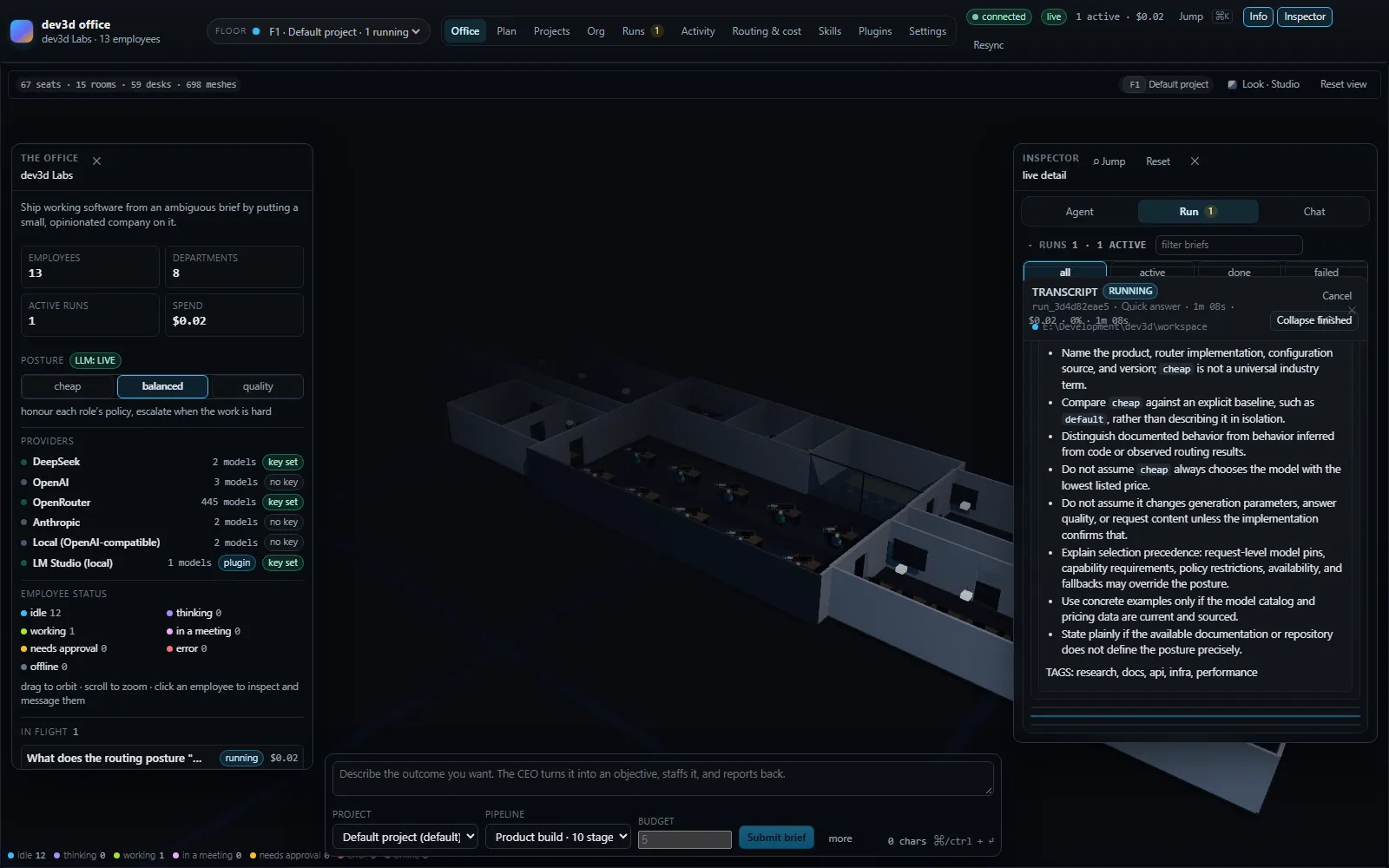
What a run is
A run is one brief. The office picks a pipeline for it — an ordered list of stages — and walks that list from top to bottom. Each stage declares a kind (what it is for), a mode (how its people are scheduled) and the roles that take part. Inside a stage, each participating employee gets one or more turns: one model call, plus any tool calls the model asks for, looped until it stops asking. Each stage also produces an artifact — a structured objective, a decision record, a spec, a transcript, a test report.
So a run is a tree: Run → StageRun → TurnRecord → ToolCallRecord, with an artifact hanging off each stage. Everything is persisted and everything is on the wire, which is why the UI can show you the same tree the engine executed. How a run flows takes that apart properly; the one-paragraph version above is enough to read the rest of this page.
Which pipeline you get is decided from the brief itself, not from a setting. A short question-shaped brief under 240 characters goes to quick-answer. A brief that looks like a change to existing work (fix, refactor, rename, upgrade, and friends) and is under 600 characters goes to code-change. Everything else goes to product-build. You can name a pipeline explicitly in POST /api/submit, and the planning conversation can shape the brief first.
What makes it different
- The office is the application. There is exactly one
WebGLRenderer, created in a mount effect rather than per tab, so switching between the office, the org chart and the settings sheets never re-creates the scene. Employees are built procedurally from each role'sappearance—bodyColor,accentColorand a height clamped to 0.8–1.3. Status is carried three ways at once: a floor ring under the selected employee, an emissive tint (a chest lamp plus a wash over the body) and body language such as typing or a hand to the chin. - Routing is cost-aware, and it is a scoring problem rather than a lookup. The old framing — "pick the cheapest capable model in the role's tier band" — is wrong, and it is worth stating correctly here because it is the core of the product. Each role carries a
ModelPolicy: adefaultTier, a hardminTierandmaxTier, optional per-task-class overrides inbyTaskClass, anescalateAtComplexitythreshold and the tier it escalates to, an output cap, and optionally apinor apreferredModelId. The router first filters on things that make a model incapable — no provider key, an explicit exclusion, no tool calling, no vision, too small a context window — and only then applies the posture. The posture moves the target tier:cheaptargetsminTier,balancedtargets the policy tier for the turn's task class, andqualitytargets one tier up, clamped back into the policy band. A weighted score then decides between candidates —0.45·fitness + 0.20·quality + 0.35·tierAffinity − costPressure·relativeCost − reliabilityPenalty + hintBonus— so a model that fits the work better at the original tier can still beat the one the posture pointed at. Tiers arenano,small,standard,strongandmax. The full mechanism, including why every rejected candidate is recorded with a reason, is on Model routing. - Roles are the unit of configuration, not prompt templates. Thirteen named roles in eight departments, each with a name, a title, a seniority, a model policy, skill ids, a tool grant list, an appearance and a seat in the building. The org chart is data you can edit while the office runs: hire, fire, change a model policy, move a seat, switch a routing posture.
- Pipelines are data too. Twelve stage kinds (
intake,plan,research,debate,workshop,design,architect,build,review,test,integrate,report) and four modes (single,parallel,debate,review-loop) compose into pipelines without touching the engine. Three ship:product-buildwith ten stages,code-changewith seven andquick-answerwith three. - Fifteen built-in tools, and an honest statement of the boundary. The choke point is
resolveInWorkspace: it rejects..and anything outside the run's workspace root, catches Windows drive-relative paths likeC:foo, rejects NTFS alternate data streams and reserved device names, and then resolves the real path and refuses any symlink, junction or mount point on the way out — so a link inside the workspace is not a way out of it. Eight of the fifteen take paths and call it:list_dir,read_file,search_files,glob,grep,write_file,edit_fileandapply_patch.thinkandtodo_writetouch no path at all. The web tools are guarded by address rather than by path: a request to a loopback, private, link-local or cloud-metadata address is refused on every redirect hop, though DNS rebinding is a documented residual rather than a closed hole.run_shellis confined by its working directory, not by path validation: it spawns withcwdset to the run's workspace root, but the command text itself can go anywhere — so it is approval-gated instead, and its child environment is stripped of credential-named variables.gitis not path-confined either and splits by what a command can do. Plugin-contributed tools and MCP server tools are not confined by the host at all. We would rather you knew that than trusted a claim the code does not make. Known gaps lists this alongside the other deliberate limits. - It runs with no keys whatsoever. With nothing configured the server boots in
mockmode, where a scripted provider answers every turn: it reads the actual brief, picks a register from the declared stage, and quotes real phrases back. It is deterministic — the same input always produces the same text — so a demo, a UI session or a test run costs nothing. The office still runs the whole pipeline, still writes artifacts, still records usage; the difference is that nobody is billed. The UI badges the mode andGET /api/healthreports both the mode and the reason it came out that way. - Extension comes in two shapes, and the declarative one is first. A plugin manifest can declare eight kinds of contribution —
providers,models,skills,roleTemplates,pipelines,routingRules,uiPanelsandtoolNames— and ten permissions (models,providers,tools,routing,skills,agents,pipelines,settings,ui,events). Credentials are never part of a bundle: a manifest names the environment variable that holds a key, and the server reads it. Everything a plugin contributes is recomputed from scratch when the set of plugins changes, never patched in place.
The numbers
These are the real counts, verified against the source rather than the README — which is stale in several places and is corrected on this site wherever it disagrees with the code.
| Thing | Count | What it means |
|---|---|---|
| Roles | 13 | Across eight departments: executive, design, research, technology, frontend, backend, platform, quality. |
| Stage kinds | 12 | From intake to report; the vocabulary a pipeline is written in. |
| Stage modes | 4 | single, parallel, debate, review-loop. |
| Pipelines | 3 | product-build (10 stages), code-change (7), quick-answer (3). |
| Built-in tools | 9 | think, list_dir, read_file, search_files, write_file, edit_file, run_shell, web_search, web_fetch. |
| Skills | 15 | Markdown documents in skills/, loaded before the server listens. |
| Plugin contribution keys | 8 | With ten separate permissions, which are a different list. |
| Wire protocol | 31 + 33 | 31 server events and 33 client commands, typed end to end over one WebSocket. The socket serves 26 of the commands, and one declared event is never emitted. |
| Curated model table | 12 | Across five provider ids; live discovery can add models the table has never heard of. |
| Office asset | 21 / 13 / 7 | 21 seat anchors, 13 desk anchors and 7 room anchors, asserted by the Blender build script. |
Status
dev3d is version 1.0.0, licensed AGPL-3.0-or-later, and declares "engines": { "node": ">=24.0.0" } with packageManager: pnpm@11.22.0. The engine, the transport and persistence are implemented and verified end to end against a running server: 305 server tests, 14 core tests, 47 plugin tests and 13 layout tests, plus a smoke harness that drives a live server as a real client through 202 executable checks, including an assertion that the org chart really has thirteen roles. The web UI is verified by typecheck, by a runtime reducer harness and by a production bundle that the orchestrator serves itself.
It is not finished, and this documentation is written on the assumption that you would rather know which parts are not. Specifically: DEV3D_RUN_BUDGET_USD is read into configuration and then never used, so the environment variable that .env.example calls a hard ceiling is not the thing that stops a run; the turn-retry prompt that renders a correction note exists but no caller ever passes one; plugin tools are forwarded a workspace root but not confined by it; the talking employee status exists and is never emitted by any code path; and the README's own claims about protocol counts, department counts and plugin confinement disagree with the code. Known gaps collects those in one place, and Verification explains how each claim on this site was checked.
Node 24 or newer is a hard floor, not a preference. The test suites are TypeScript executed directly by node --test --test-isolation=none, and persistence is built on the unflagged node:sqlite. On an older runtime the orchestrator may start, but the suites will not load and the store degrades to an in-memory fallback — which means you would be running an untested build whose history disappears on exit.
Who it is for, and what it is not
dev3d is for people who want to watch a multi-agent system actually work, rather than read a diagram of one. That is a narrower audience than "anyone who wants AI to do their work", and it is worth being explicit about the shape of the thing before you install it.
- You want delegation you can audit. Every turn has an employee, a purpose, a model, a reason for that model, the skills that were pulled in, the files it wrote and the tools it called. Nothing about a run is inferred from a log line — the record is the product.
- You care what a turn costs. The whole point of the org chart is that different work deserves different models. If you have ever wanted to ask "was that turn worth a frontier model?", the router's recorded decision is the answer.
- You want to extend an agent system without forking it. Roles, pipelines, routing rules, skills, models, tools and UI panels are all contribution points, and two of the three shapes a plugin can take ship no code at all.
- You want it to run on your machine. One orchestrator process, one SQLite file, no account and no hosted control plane; the office is served from the same process as the API. With no keys configured it makes no outbound model calls, because mock mode never discovers and an unconfigured provider contributes no candidates.
It is not a hosted service, not a general-purpose agent that runs unattended for days, and not a framework for building your own orchestrator. Runs are bounded by a pipeline and a budget; the file tools are confined but the shell tool is not; plugin tools are not confined by the host at all. If you need hard sandboxing as a guarantee, this is not the tool that gives it to you, and the pages that describe those mechanics say so rather than burying it.
Where to go next
| If you want to… | Read |
|---|---|
| See it running in the next five minutes | Quick start — two commands, no keys required. |
| Know what each provider key buys you | Installation — keys, modes and the first-boot precedence rules. |
| Understand what the engine is actually doing | How a run flows — the record hierarchy, stage modes, budgets and failure policy. |
| Understand the building | The office — what the floor plan, seats and status colours encode. |
| Understand how a turn gets a model | Model routing — postures, policies, scoring and rejection reasons. |
| Configure it properly | Environment — every variable, its real default and whether it survives a restart. |
| Extend it | Building a plugin and the plugin manifest. |
| Browse what others have published | the marketplace. |
Where to go next
Linked from
Did this page answer your question?